
How to Identify?
1. Check the Sender's Information:
- .Does it match the sender's organization or company? Look for slight misspellings or unusual domain names (e.g., @gma1l.com instead of @gmail.com).
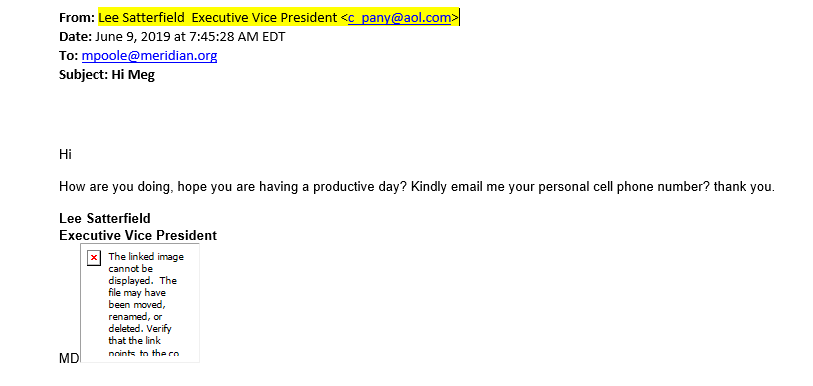
- .Does it match the email address and the context of the email? Sometimes, phishers will use a name that seems familiar but is not actually associated with the email address. See example below.
- .Some email providers offer authentication indicators (like a verified badge) that can help confirm the sender's legitimacy.
2. Analyze the Email Content:
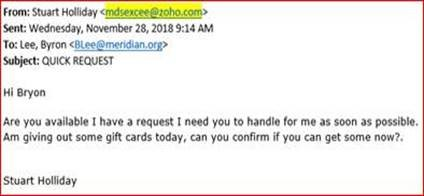
- Phishing emails often try to create a sense of urgency or fear to pressure you into acting quickly without thinking.
- If the email is addressed to "Valued Customer" or "Dear User," it's a strong indication of a potential phishing attempt.
- Avoid opening attachments from unknown senders, especially those that appear to be invoices, tax documents, or shipment notifications.
- While AI is making phishing emails more sophisticated, grammatical errors and misspellings are still common red flags.
- Legitimate organizations rarely ask for personal information like passwords, credit card details, or Social Security numbers via email. See example below.
- Be highly skeptical of emails promising rewards, prizes, or discounts that seem unrealistic or unsolicited.
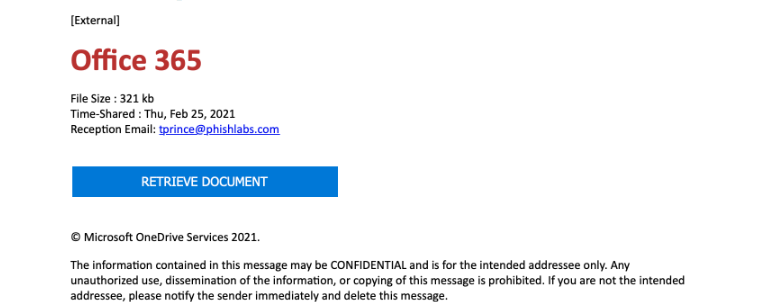
- Look for inconsistencies in the email's design, branding, or formatting, which can indicate a phishing attempt. (Phishing emails often uses Microsoft branding to trick you.)
3. Examine the Links:
- .Before clicking on any link, hover your mouse over it to see the actual URL. If the URL doesn't match the text of the link or looks suspicious, don't click on it.
- .Ensure the domain name in the URL is associated with the sender and not a different or misspelled version.
- .Shortened URLs (like those from bit.ly) can mask the true destination, making it harder to verify the link's legitimacy.
- By being vigilant and following these tips, you can significantly reduce your risk of falling victim to phishing attacks.
How to Respond?
1. If you are UNSURE that an email is phishing:
You can send it to IT for assessment at helpdesk@meridian.org.
2. If you are SURE that an email is phishing:
You may either right click and select Junk/Block Sender (image 1 below) or click the "Report" button on your Outlook Toolbar (image 2 below). You can also just delete the email.
Image 1
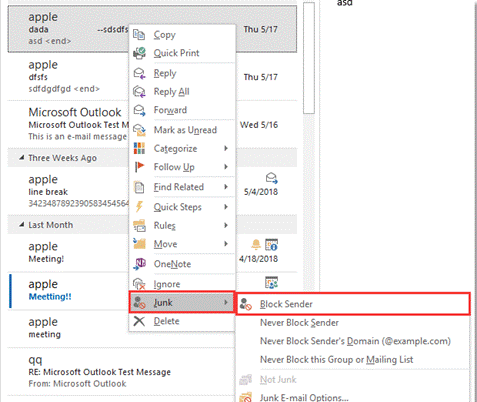
Image 2
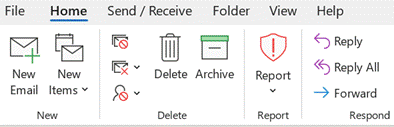
***Whether you're sure or not that an email is phishing, do not open attachments, click links, or scan QR codes until you've confirmed it's safe***
For more information on how to better identify and avoid phishing e-mail attacks, please watch this short 4 minute video below.