
Meridian International Center has set up Quarantine for incoming email messages in Office 365 to allow users to identify messages that have been filtered as spam, bulk mail, phishing mail and mail that contains malware. This is in efforts to better manage messages that might have been falsely identified as Spam by Microsoft.
What is Quarantine email?
These are messages that are stored in a quarantined folder(separate from your Spam folder) which have been identified as bulk mail, phishing mail, and mail that contains malware. You can now review, and if need be release these messages from your Quarantine in the event that legitimate messages are inadvertently detected as spam.
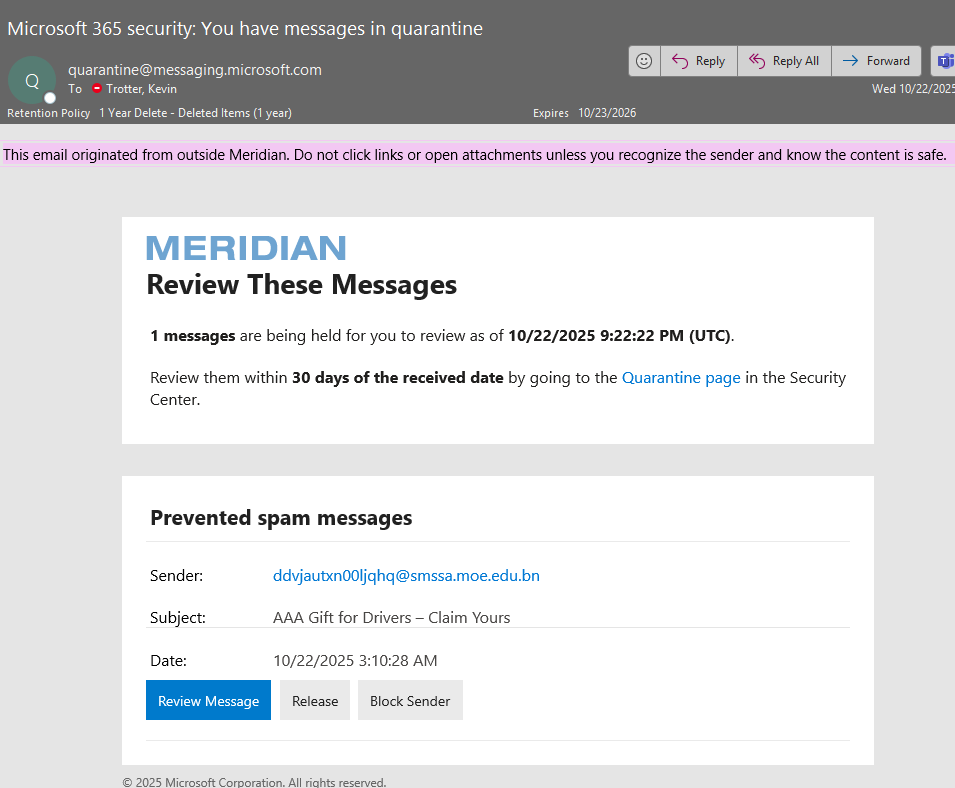
What does the Spam Notifications Report look like?
The report will look like the following image:
What do you have to do once you receive these Quarantine notifications?
Each Quarantine email will give you the following options:
- Review the message if you would like to preview the content or header prior to taking action.
- Release to Mailbox if the message isn't spam and you want Office 365 to send the message to your mailbox.
- Block Sender if you want Office 365 to add the sender to your blocked senders list.
If you choose to ignore the reports, the e-mail remains in Quarantine.
Please note that some spam messages in your quarantine summary may look legitimate; so please ensure that you are diligent in identifying the messages you choose to move to your inbox.
If you have any questions, please contact helpdesk@meridian.org