
Anyone who attends a Project or Program with Meridian should be connected to a Project via the Project Visitor object. The Project Visitor needs to be a Contact already in Salesforce before we can connect them. The individual data for the Visitor as they progress through their Project will be captured on the Project Visitor record. You will be able to view all Project involvement for each Visitor on their associated Contact record.
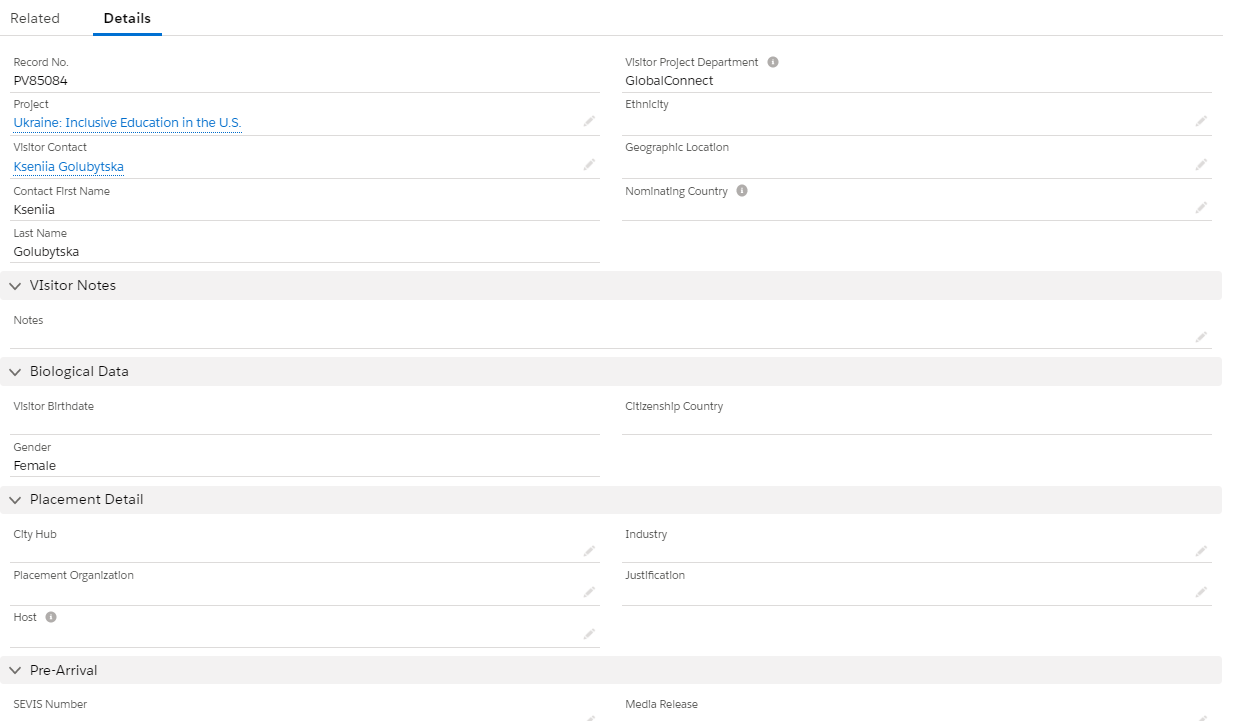
Information unique to the Visitor's involvement on the Project should be saved under the Project Visitor record. Anything that is constant with the Contact should be saved on the Contact record and can be brought into the Visitor record via a lookup field.
For example, above you can see that the Biological Data section looks like it should contain fields that should be available on the Contact record, and they are! If you look closely, you can see that most fields have a pencil next to them, which means that they are editable. Those fields that do not have that icon are not editable for some reason - in this case it is because the fields for Visitor Birthdate, Gender, and Citizenship Country are being pulled from the Contact record into the Visitor record. To update them on the Visitor record, you would need to click into the Contact record. Any edits to the Contact for those fields will automatically populate on the Visitor record.